Skip to content
Logbook
In testing · TestFlight

The logbook for people who fly for a living.

An EASA logbook for pilots, block time for cabin crew and lessons for students, straight from the roster. Everything lives on your phone and in your own iCloud.

For iPhone and iPad · Imports from LogTen Pro, SAS Airside, Flighty, FlightLogger and myWebLog

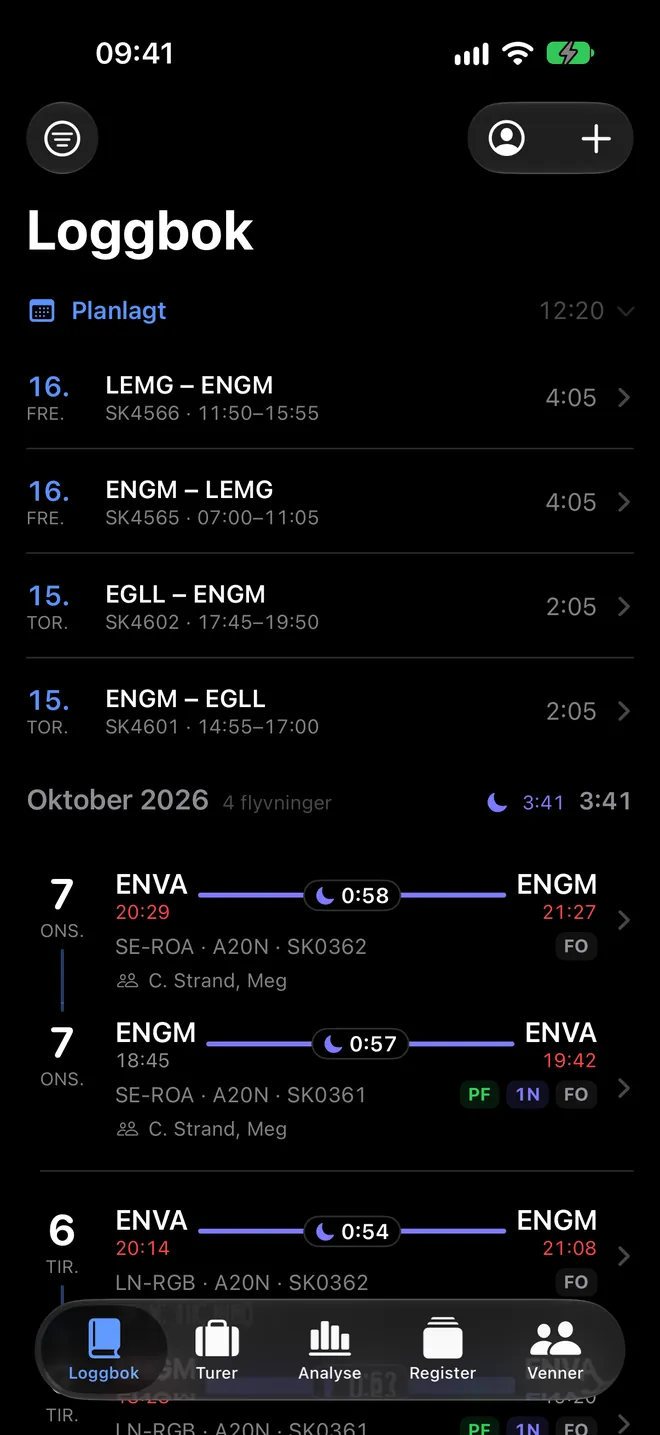
The logbook in Logbook: logged flights with night, late in red and early in green, aircraft and crew

Features

Less typing. More flying.

Logbook takes what the roster says, works out what can be worked out, and leaves the rest to you.

The roster becomes the log

Legs from the crew calendar or SAS Airside appear as planned flights. Once flown they are logged with actual times, and Airside fills in check-in and check-out, so duty time comes out right.

  • Late in red, early in green, as on the airport board
  • Legs that follow each other become a trip
  • A flight you have logged is never changed by a sync

Airside and Flighty arrive by themselves

Airside and Flighty can only e-mail their exports. So your phone gets an import address of its own: type it in once, and Logbook fetches the file itself and adds what is new, even while the app is closed.

  • You see when an e-mail arrived and what was imported
  • Flights you logged yourself are never touched
  • The file is deleted at logbook.no as soon as your phone has it

Roster changed? You see exactly what

The calendar is read in the background. When the roster ahead changes you are told, with a before-and-after view of every day that was touched, so you never hunt for the difference.

  • New, moved and removed legs are marked each in their own way
  • The planned flights in the log are updated at the same time
Roster changes in Logbook: every changed day, with legs marked as new, moved or removed

Every flight, worked out

Block and flight time, night and landings are filled in for you. The sun's height along the route, minute by minute, gives the night time, detours around closed airspace included. You can always override, and what you type yourself stays.

  • Planned and actual times side by side
  • Signing on screen and an EASA PDF with every column
  • Captain, first officer and cabin crew from the directory
A flight in Logbook: ENVA to ENGM with departure, arrival, times in UTC and local, and the aircraft

Days off, vacation and standby

Roster codes become a calendar with week, month and year views. Codes the app does not know, you decide the meaning of.

  • The year view shows the whole year at a glance
  • The week as timelines in UTC, across midnight too
The year calendar in Logbook with flying days, days off, vacation and standby in colour

The numbers you need, when you need them

Totals for the whole career, year by year and per type. FTL limits and currencies are followed for you, and certificates and the medical sit with their expiry dates where you see them.

  • Flight time per month, year and type
  • A warning before a limit or currency runs out
  • Records: longest day, most legs, furthest north and south
Analyze in Logbook: total flight time, this year's flights, sleep and certificates
Flight time per year and per month in Logbook

Flight passport: your year in the air

Countries, airports, aircraft and distance, longest and shortest flight, layovers and delays. Every route on the map, and a card to share with one tap.

  • The fleet directory shows name, age and a photo of the aircraft you have flown
  • Each year on its own, or the whole career
The flight passport card in Logbook for 2025: flights, distance, countries and aircraft
A map of every route in the logbook

See when you are off together

With an optional account you add colleagues and see their days off and flights beside your own. You decide what is shared.

  • Only the roster is shared, never the logbook
  • Hour by hour: who is free when, on layovers too
  • Crew from your airline in the same city, if you want
Everyone's roster in Logbook: you and your friends side by side, with the days you are off together

Bring the log you have

Import your whole history from LogTen Pro, SAS Airside or Flighty. Flight school student? Download the log from FlightLogger and lessons, instructors and simulator sessions come along. You see everything before anything is saved, and what the app is unsure about, you decide.

  • Flights you already have are never changed
  • A backup before every import, daily in iCloud Drive
  • Cabin crew? Choose cabin and the app shows block and duty time without the pilot fields
Choose where your flights are today: airline, logbook apps or flight school

The screenshots are from the app, with a fictional logbook.

Logbook Pro

Fly rested. Land informed.

The logbook is free. Pro adds what needs more: sleep against the roster, live flight data, per diem before the statement, the route as flown and a roster page for your family.

How heavy will the duty be?

Logbook reads your sleep from Apple Health and holds it against the roster, so you see which duties may wear you out and how to prepare. The model starts from research on flight crew and learns your own numbers.

  • Health data is read on the phone and never sent to us
  • An estimate, not a judgement: only you decide whether you are fit
  • One tap after landing teaches the model how you feel
Sleep and fatigue in Logbook: expected sleepiness through a duty, with the sleep the night before

The next flight, live

Gate, delay, aircraft and the inbound machine on the logbook's front page from a few hours before departure. The Lock Screen gets the gate and new times 75 and 30 minutes before each leg, abroad too, and an alert when the expected departure slips a quarter of an hour, from two hours before.

  • Actual and expected times against the schedule
  • After landing the leg comes in with actual times, ready to log
  • Norwegian airports are free for everyone, with data from Avinor
The next flight in Logbook: SK1517 from Copenhagen to London with gate, terminal and expected time

Per diem before the statement

Every pairing worked out by SAS's rules: one per diem per 24 hours from an hour before the first departure to half an hour after the last block-on, allocated to the stops in their currency and converted to yours. The month as the statement settles it, for the trips ahead of you too.

  • Checked against real statements, pairing by pairing
  • Double on public holidays for pilots based in Denmark and Norway
  • Rates from January 2026, exchange rates from the European Central Bank
Per diem in Logbook: the month with its per diem count and amount, and each pairing with stop, currency and converted amount

The route as flown

Open a logged flight and see the track on the map, with taxi out and in, airborne time and the highest level. Take-off and landing go into the form with one tap.

  • Tracks for 30 days after the flight, from Flightradar24
  • 30 new tracks a month; tracks someone already fetched are free
The route as flown in Logbook: the track from Trondheim to London on the map, with first movement, take-off, landing and on blocks

Who rests when

On a long haul with augmented crew, Logbook shows which rest break leaves you most awake for the landing, from your own sleep and body clock. The schedule itself and the wake-up calls live in the Crew Rest app, one tap away.

  • Three or four pilots, equal breaks over the cruise
  • Expected sleepiness at top of descent for each break
Crew rest in Logbook: three breaks on a duty to San Francisco, with expected sleepiness at top of descent for each and the best one marked

A roster page for your family

Create a link and the people at home see your days off, standby and flights for the next two months in a calendar in their browser. No app, no account. Stop sharing and the page goes blank.

  • What your friends see, never the logbook
  • Times shown in the reader's local time
The roster page on logbook.no: the next flight on top and a month calendar with flying days, days off and layovers

Free

Everything you need to keep the log.

  • EASA logbook with signing and PDF
  • Roster, calendar and roster changes
  • Import from LogTen Pro, Airside, Flighty and FlightLogger
  • Analyze, limits, currencies and the flight passport
  • Friends and shared roster
  • Sync and backup in your iCloud

Logbook Pro

Everything in Free, plus what needs more.

  • Sleep and fatigue against the roster, and which crew rest break suits you
  • The next flight live, the gate on the Lock Screen abroad and delay alerts from two hours before
  • Logging that does itself after landing
  • Per diem by pairing and month, in the currency of each stop
  • The route as flown, with taxi times
  • A roster link for your family, no app needed
  • Milestones, this year against last and the hours of the day
  • Table, bulk edit and advanced filter on iPad
  • Reminders before certificates expire
Best valueYearlyNOK 1991 month free
Pay monthlyYearlyNOK 19a month for 12 months
No commitmentMonthlyNOK 292 weeks free

Bought in the app and renewed automatically until you cancel in the App Store. Family Sharing is on. TestFlight testers have Pro for free. Prices in your own currency in the App Store. See the terms.

Together

Built with the people who fly

Write to the Logbook team from the app when something is unclear, and vote up the suggestions you want. Shake the phone to send a bug with a screenshot.

  • Chat with the team under Settings
  • Suggestions with votes and comments, and a notification when the status changes

Privacy

Your data is yours

Logbook has no server of its own for your log. Read it all in the privacy policy.

The log stays with you

Flights, certificates and the address book are stored on the device and in your private iCloud.

Only what is needed

Fleet directory, flight status and import by e-mail send only a registration or a flight number, never the log.

An account only if you want one

Sign in with Apple for friends, shared roster, suggestions and chat. Stored in the EU, and you can delete it at any time.

Questions and answers

Which airlines are supported?

Anyone can keep a logbook and import from LogTen Pro, Flighty and FlightLogger. Rosters are read from SAS today, through the crew calendar or Airside, and bookings from flying clubs that use myWebLog. Fly for another airline? Put it on the list in the app and we will tell you when it is ready.

How do I get the Airside or Flighty export in?

The app shows an import address that is yours. Enter it in Airside under Export flight log, or in Flighty under Settings › Account Data › Export Your Flights, and Logbook fetches the file itself, even while the app is closed. You can also import the file from Files.

I am a student. Can I use Logbook?

Yes. Download the log from FlightLogger (my.flightlogger.net › Logbook › Export) and import it. Lessons, instructors, simulator sessions and landings come along, and you keep the log in the app from there.

What does it cost?

The logbook is free. Logbook Pro, with sleep and fatigue, live flight status, per diem and insights, is NOK 29 a month or NOK 199 a year, or NOK 19 a month for twelve months for a yearly plan paid monthly; the App Store shows the price in your currency. There is a free trial, and you cancel in the App Store.

Does the per diem match the statement?

The units match pairing by pairing on the statements we have checked. The amount in your own currency differs a little, because SAS uses its own monthly rate and the app uses the central bank's rate at the start of the month. Meal reductions and tax are not shown.

What does my family see on the roster page?

Days off, standby and flights with route and times, from a week back to two months ahead. Never the logbook, block time or remarks. The link can be ended at any time in the app.

Do you store my health data?

No. Sleep and fatigue reads your sleep from Apple Health on the phone. It is used only there, never sent to us and never written back to Health.

Do I need an account?

No. The logbook works without one. An account (Sign in with Apple) is needed only for friends, shared roster, suggestions and chat with the team.

Does it work for cabin crew?

Yes. Choose cabin when you start and the app shows block and duty time, days off and the roster, without the pilot fields.

Can I use it on both iPhone and iPad?

Yes. With the same Apple Account the log and settings sync between devices through iCloud. On iPad the whole log can be shown as a table, sorted and bulk edited (Pro).

Does the app work offline?

Yes. The logbook, roster, per diem and sleep live on the phone. Live flight data and the route as flown need a connection, and come back when you are online.

How do I become a tester?

Leave your e-mail address below and we send you a TestFlight invitation when it is your turn.

Join the test

The app is in testing on TestFlight. Leave your e-mail address and we send an invitation when it is your turn.

You are on the list

We send the invitation by e-mail. Want to tell us a little more about yourself? Fill in the rest here (Norwegian).

Role, airline and logbook today? Fill in the whole form (Norwegian)